
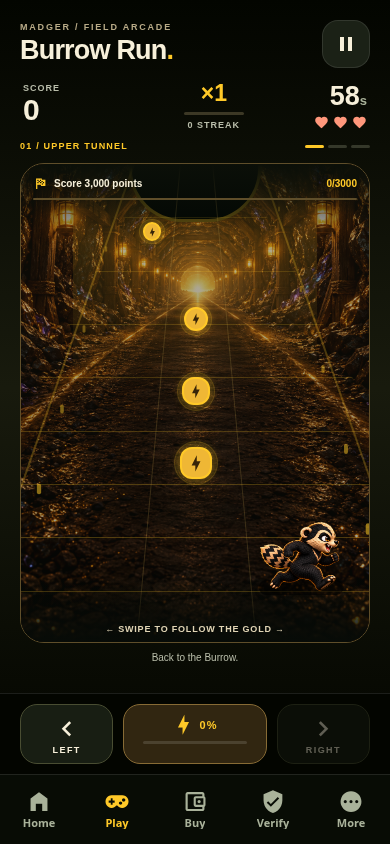
MADGER 1.3.0 now has a public, downloadable Android preview release. It is a game-first build with Burrow Run, local high scores, a daily route, achievements, earned cosmetic trails, and settings that persist on the device. It does not require an account, wallet, token purchase, ads, or a remote leaderboard.
That is the useful release. The equally important disclosure is what did not happen: MADGER has not established a Google Play or Apple App Store release through the public evidence reviewed on October 15. The Google Play internal-release workflow stopped at its access check because the required Expo credential was not configured; its build-and-submit step did not run. A workflow name, merged pull request, or version number is not proof of store availability.
The reader benefit: know which “released” someone means
Software can be available in several different states at once. Treating all of them as “launched” makes it harder to test safely and easier for a fake download page to borrow credibility. MADGER’s current states are:
| Surface | Status on Oct 15 | What that means |
|---|---|---|
| Browser Burrow Run | Public and playable | Opens at madgercoin.com with no install, wallet, account, or purchase. |
| Android 1.3.0 preview | Public prerelease | A downloadable APK built by the project’s public Mobile CI and signed with a generated development key. |
| Google Play internal track | Not proven delivered | The public automation failed before building or submitting because its Expo access token was absent. |
| Google Play public listing | Not claimed | No public Play Store release is part of this dispatch. |
| Apple App Store / TestFlight | Not claimed | The repository has an iOS bundle export, not evidence of Apple review or distribution. |
If any message says “MADGER is in the app stores,” ask for the exact store listing controlled by the verified publisher. Until the official source directory adds one, treat that claim as unsupported.
What changed in 1.3.0
The app now opens around the game instead of asking people to navigate through a general project dashboard. The four main tabs are Home, Play, Scores, and Settings. That is a product decision with a clear utility: a person can do something immediately, keep a private record, and return for another run without connecting financial infrastructure.
- Burrow Run became a complete 60-second arcade loop. It has three tunnel zones, swipe or button controls, signal trails, shields, magnets, close-dodge bonuses, and a charged Dig Burst.
- Progress persists locally. Classic and daily scores are separated; the app keeps recent runs, personal bests, XP levels, eight achievements, four cosmetic trails, and player preferences.
- The daily route is repeatable. A UTC date seed gives everyone the same route for that day without requiring a central account or leaderboard.
- Rewards are cosmetic. Trails do not change scoring, and the preview offers no token rewards, prizes, purchases, or advertisements.
- Failure is visible. Storage problems block play or expose retry actions instead of pretending a score was saved.
The implementation notes, limits, and persistence model are documented in the public game-first report and mobile README. The 1.3.0 product commit exposes the source changes rather than asking readers to infer them from screenshots.


What the public test record proves
The Mobile CI run that published preview 59 completed successfully on October 14. Its jobs validated the release source, checked the Expo configuration, exported Android and iOS bundles, built the standalone Android preview, inspected the APK permissions, exercised the game and score flows in a browser, ran the APK on an Android emulator, and published the tested artifacts as a GitHub prerelease.
The public release includes:
- the
madger-1.3.0-preview.apkAndroid installer; - an install ZIP for Android;
- a SHA-256 checksum file;
- a verification archive containing reports and screenshots; and
- a source archive tied to the release tag.
GitHub’s release record reports this SHA-256 digest for the preview APK: 469772f706b014f77e250a6caf4fb1b6c5db5d310d010f080068062051489266. Match the entire value against the downloaded file before installing. A checksum tells you whether you received the published artifact; it does not prove that the code is bug-free or that sideloading is appropriate for your device.
What the evidence does not prove
Automated checks and an emulator are useful, but they are not a substitute for every release gate. The preview uses a generated development signing key and installs separately as MADGER Preview. That deliberately avoids implying the trust chain of a production store build.
The evidence does not prove physical-device acceptance across the Android ecosystem, iPhone acceptance, accessibility on every device, long-term storage durability, store approval, production signing, or successful delivery to a Google Play testing track. It also does not guarantee future features, adoption, revenue, token demand, token price, liquidity, or investment returns.
A transparent release note should make the missing proof as easy to find as the finished work.
The failed store workflow is part of the record, not something to hide. It failed before the source validation and build/submit stages because the repository’s EXPO_TOKEN secret was empty. That means the public evidence supports “release automation was added and attempted,” not “1.3.0 was submitted to Google Play.”
A safer five-minute test route
- Try the browser game first. Open madgercoin.com/game. It requires no installer and is the lowest-friction way to decide whether the gameplay interests you.
- Use one canonical download page. If you want the Android preview, start at the official GitHub prerelease. Do not install an APK sent through a direct message or a lookalike domain.
- Confirm the label. The page must say Pre-release, the tag must be
mobile-v1.3.0-preview.59, and the app should identify itself as MADGER Preview. - Verify the checksum. Compare the complete APK SHA-256 value with the digest above and the checksum file attached to the release.
- Use a test device when possible. Sideloaded previews have more risk than store-managed installs. Keep device backups current, review the permissions prompt, and do not weaken permanent security settings just to install an experimental build.
- Expect no wallet request. The game does not need a seed phrase, private key, token approval, or wallet connection. If an app using MADGER branding asks for one, stop.
Crypto stays outside the game loop
The mobile app includes official project and education links, but the game itself is not a transaction interface. There are no token rewards, in-game purchases, or wallet connections in the documented preview. Keeping those boundaries separate is part of the utility: people can play and evaluate the product without being pushed toward a financial action.
The exact official Solana mint is BHauMX8akk2umqkQqnJwpYkCRkZmefGnEBFByeFXRKqv. If you later choose to research the token, compare all 44 characters against the official directory. If you are new to Solana, use the dedicated beginner buying guide for wallet setup, SOL fees, mint matching, slippage, and transaction risk. The buying path remains separate from the game and from this release note.
What should happen next
The next credible milestone is not a louder announcement. It is new evidence: a successful production-signing and store-delivery run, physical-device acceptance records, and an official listing added to the source directory. Until those exist, the Android prerelease should continue to be labeled a preview.
Community members can help now without buying anything: test the browser game, inspect the preview evidence, report reproducible bugs, and describe the device and steps that caused them. The Burrow Commons remains the no-purchase path for useful participation.
The signal
MADGER 1.3.0 is real work people can inspect and Android users can test. It is also unfinished distribution work. Both facts belong in the same release note. That is how a preview becomes useful without becoming misleading.